
💡 Why hide negative comments?
Negative comments on your ads and posts damage brand reputation and put off potential customers. Hiding them removes them from public view automatically - before anyone else sees them.💡 Hiding doesn’t cut off the conversation. The commenter can still see their own comment and will still receive any reply or DM you send them. Hiding also doesn’t stop other rules from firing - a hidden comment can still trigger a DM.
✅ Before you start
- Make sure Processing Mode is set to Advanced before creating any rules. See Understanding Processing Mode (to be added).
- No AI agent is required for hide rules. You can set this up immediately after connecting your account.
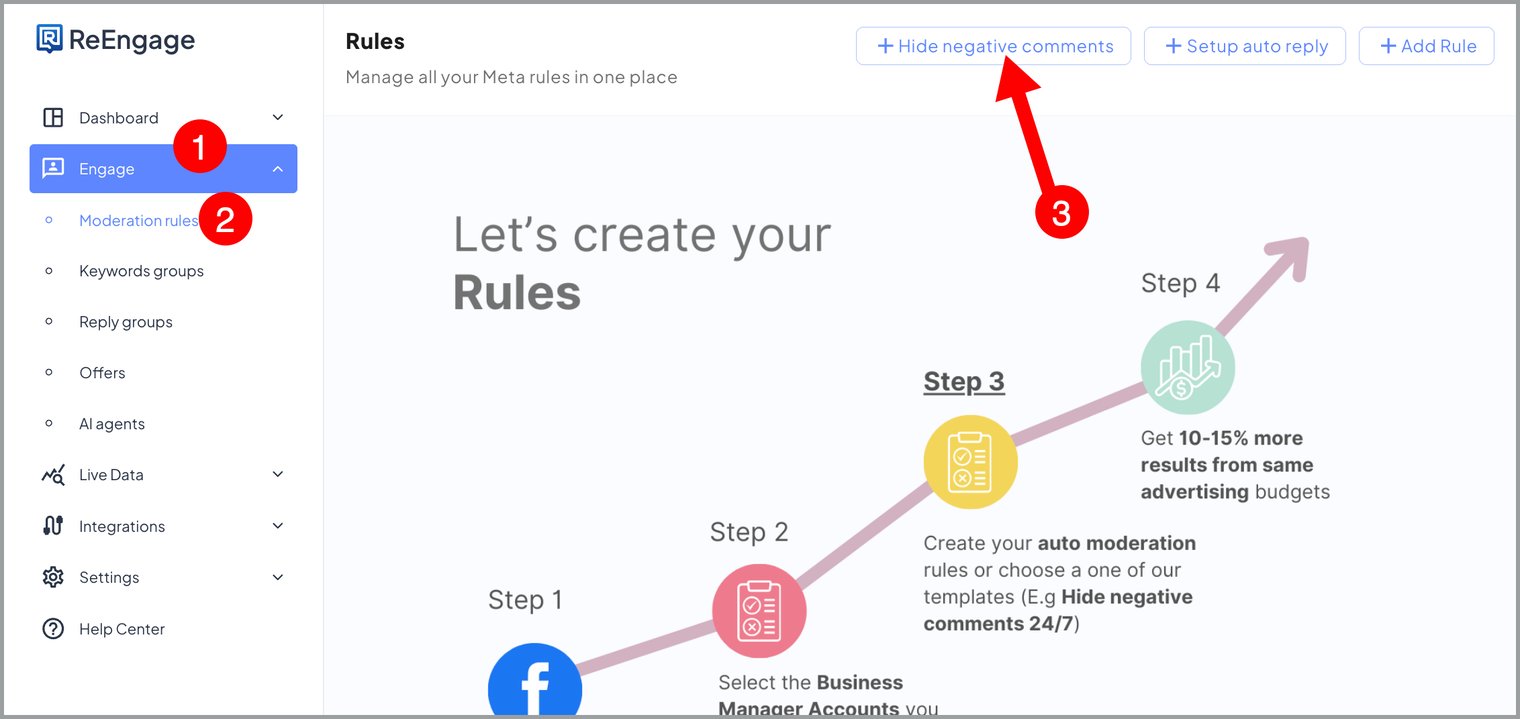
🛠️ Create your hide rule
To hide negative comments by sentiment, you need one rule. To also hide by keyword, see Hiding Comments by Keyword- that requires a separate rule.Option A - Quick start
- Go to Moderation > Rules
- Click the Hide negative quick-start button
- Follow the steps below from Step 3 onwards
Option B - Manual setup
- Go to Moderation > Rules > Create Rule
- Continue with the steps below
Step 1 - Name your rule
Give the rule a descriptive name so you can identify it later. Example:Hide Negative - Facebook
💡 Include the platform in the name. You’ll need a separate rule for each platform, so clear naming prevents confusion.
Step 2 - Set the Moderation Target
Select which platform this rule applies to.| Option | When to use |
| Facebook Comments | For comments on your Facebook posts and ads |
| Instagram Comments | For comments on your Instagram posts and ads |
⚠️ You need a separate rule for each platform. An Instagram rule will not catch Facebook comments, and vice versa.
Step 3 - Select engagement type
Choose whether this rule applies to paid engagement, organic engagement, or all engagement.| Option | What it covers |
| Paid | Comments on ads only |
| Organic | Comments on regular posts only |
| All | Both ads and regular posts |
💰 Paid vs organic engagement
When deciding which engagement type to apply your hide rule to, consider how you want to manage each:- Paid ads - hiding negatives aggressively is recommended. Negative comments on ads damage performance and put off potential buyers.
- Organic posts - a lighter touch may be preferred depending on your brand’s approach to public engagement.
- All - simplest setup. Apply to all if you want consistent moderation across everything.
📋 Note: Boosted posts - posts that started as organic and were later promoted - may not always be classified correctly as paid or organic. This is a known limitation being worked on.
Step 4 - Select your pages
Select the pages this rule applies to, or click Add all pages to apply it across all connected pages.Step 5 - Set the condition and sentiment labels
- Set Condition to Matches Sentiment
- Under Sentiment Labels, select Negative and Abuse/spam
⚠️ Abuse/spam is not pre-selected by default. You must manually select both when setting up this rule or the rule will not hide anything.
Step 6 - Set the action
Set Action to Hide comment.Step 7 - Save and activate
Make sure it is active and click Submit.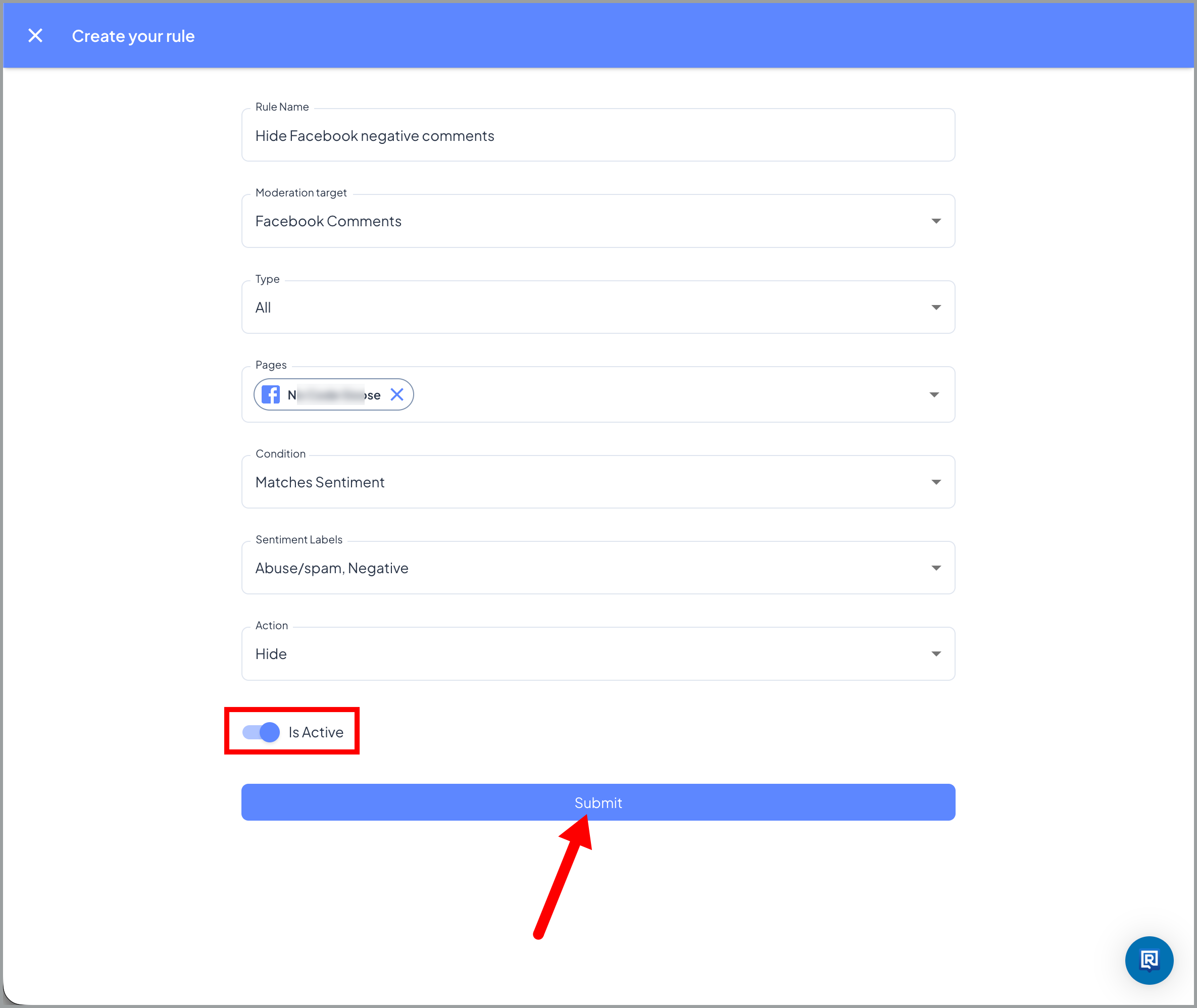
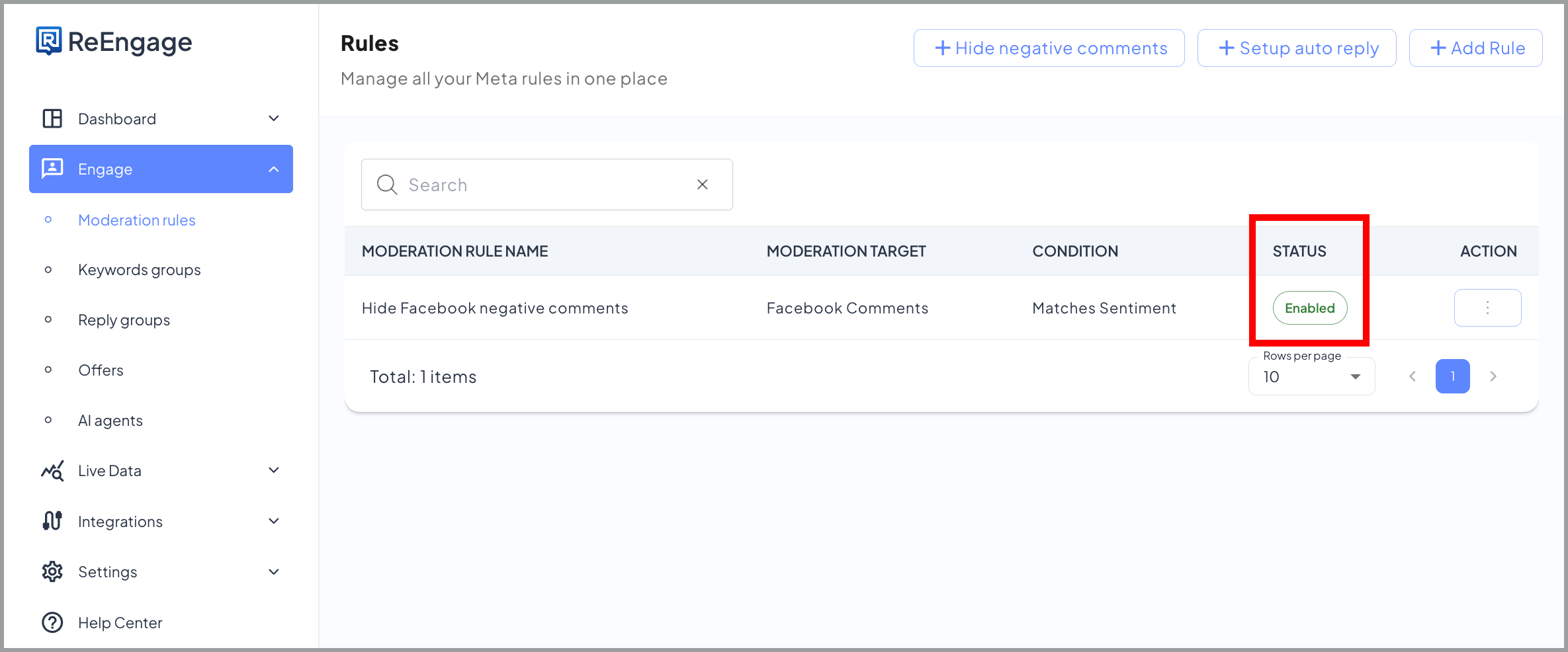
✅ You’re done when your rule appears in the Rules list with an active status and the correct Moderation Target and sentiment labels shown.
❓ FAQs
🙈 Q: What does hiding a comment do in Exerta? Hiding a comment removes it from public view so other people cannot see it. The commenter can still see their own comment and will still receive any reply or DM you send them. Hiding does not block other rules from firing - a hidden comment can still trigger a DM to the commenter.⚠️ Q: A negative comment isn’t being hidden. What’s wrong? There are three things to check:
- Negative and Abuse/Spam are not selected under Sentiment Labels in your rule. These are not pre-selected by default - open your rule and confirm both are manually selected.
- The Moderation Target doesn’t match the platform. An Instagram rule will not catch Facebook comments. Check that your rule’s Moderation Target matches the platform the comment appeared on.
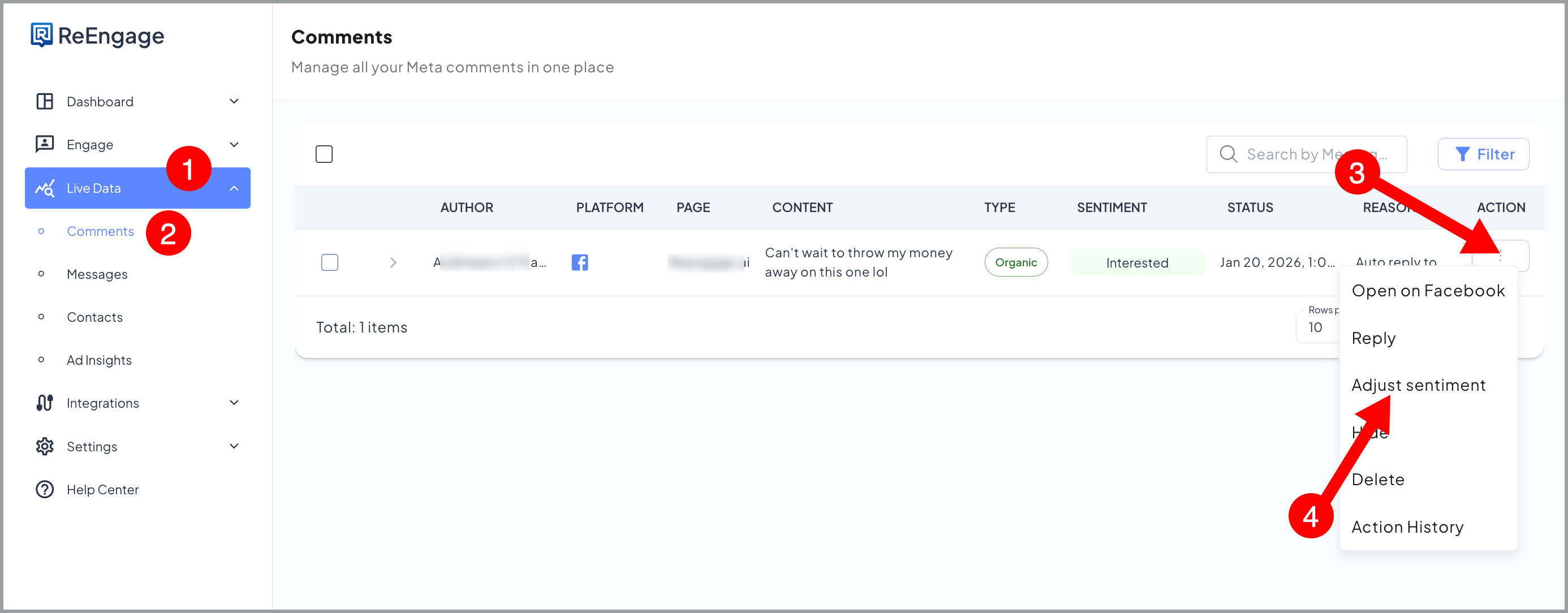
- The comment may have been misclassified. Find the comment in Live Comments, check the sentiment label assigned to it, and adjust it if it’s wrong. For example, a sarcastic comment may have been classified as Positive instead of Negative. Adjusting it manually trains the agent to recognise similar comments correctly in future. but only if Moderation Learning is enabled. See Understanding Processing Mode.
🔍 Q: Do I need two separate rules to hide by both sentiment and keyword? Yes, you need two separate rule to hide by both sentiment and keyword. Hiding by sentiment and hiding by keyword require two separate rules. If you combine them into one rule using “Keywords and Sentiment Match”, both conditions must be true at the same time - a negative comment without a keyword won’t be hidden, and a keyword comment with neutral sentiment won’t be hidden either. See Hiding Comments by Keyword (to be added) for keyword-based hide rule setup.
📋 Q: Do I need an AI agent to set up hide rules? No. Hide rules only need a condition and the Hide comment action. No AI agent is required.
🔍 Q: Can I add keywords to this rule as well? You can optionally add keyword groups to this rule in the Conditions section. However, for full coverage it is better to set up a separate keyword hide rule. See Hiding Comments by Keyword (to be added).
⚠️ Q: Why do Negative and Abuse/spam need to be selected separately? Negative and Abuse/spam are two distinct sentiment labels in Exerta. Negative covers complaints, criticism, and hostile comments. Abuse/spam covers spam and abusive content. Selecting both gives you the widest coverage for comments you want hidden.
Q: My hide rule was working before but has stopped. What should I check? If a rule that was working has stopped, check these in order: • Rule is still active. Check your rules page and make sure that the rule to hide negative comments status is enabled. • Meta connection is still live. Go to Integrations and check your connection is still enabled. • Moderation Target still matches the right platform. Confirm the rule platform hasn’t been changed accidentally.
Q: Does hiding a comment affect my ad performance metrics? Hiding a comment removes it from public view but does not affect your ad delivery, reach, or spend. Your ad continues to run normally.
Q: Can I hide every comment on my page including positive ones? Hide rules are designed for negative and spam comments. Setting rules to hide all comments, including positive and neutral ones, is possible but not recommended. It can suppress genuine engagement in your page which could boost your brand credibility and trust. Always target specific sentiment labels or keywords rather than catching everything.