> ## Documentation Index
> Fetch the complete documentation index at: https://docs.exerta.ai/llms.txt
> Use this file to discover all available pages before exploring further.
# Hiding Comments by Keyword
> Automatically hide any comment containing words or phrases you define, regardless of AI sentiment classification.
Create a keyword list to automatically hide any comment containing words or phrases you define, regardless of how the AI classifies its sentiment.
***
## 💡 Why use this?
Sentiment detection catches most negative comments, but some things you always want hidden regardless of tone: competitor names, spam phrases, politically sensitive terms, or specific phrases that signal a comment should be removed. Keyword hiding gives you direct control over this.
***
## ✅ Before you start
* Make sure Processing Mode is set to Advanced in Settings > Config
* This is a separate rule from your sentiment hide rule. It's recommended to have both for better coverage
***
## 🔧 How to set up a keyword hide rule
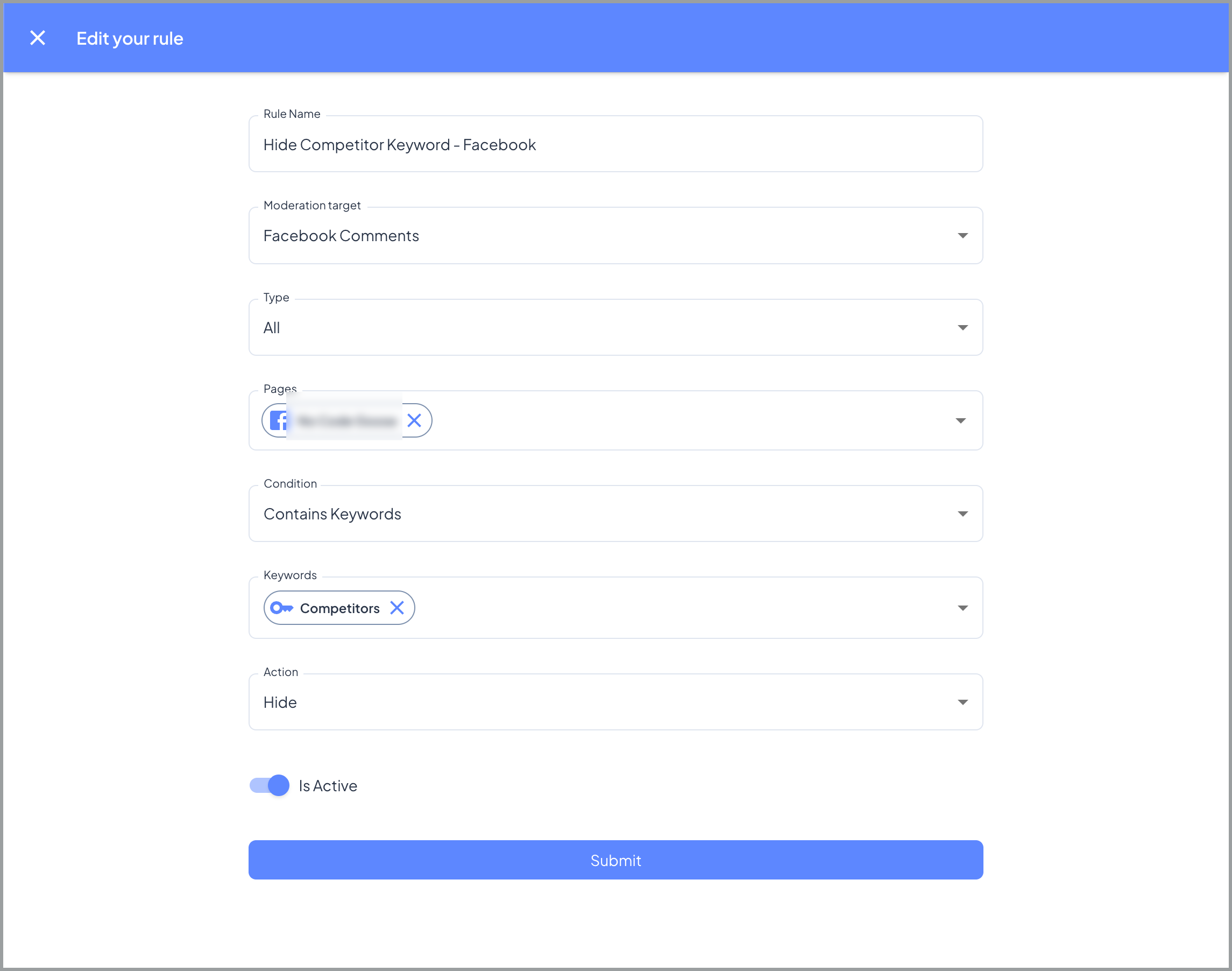
1. Go to Moderation > Rules > Create Rule
 2. Give the rule a name (e.g. "Hide Keywords - Facebook")
3. Set Moderation Target to Facebook Comments (or Instagram Comments)
4. Select whether this rule applies to paid engagement, organic engagement, or all
5. Select the pages this rule applies to, or click Add all pages
6. Set Condition to Contains Keywords
7. Add your keywords in the Conditions section
8. Set Action to Hide comment
9. Submit the rule
📋 Known limitation: Keywords must be entered one at a time. Bulk paste is not currently supported. If you reach the keyword limit on a keyword group, create a second group.
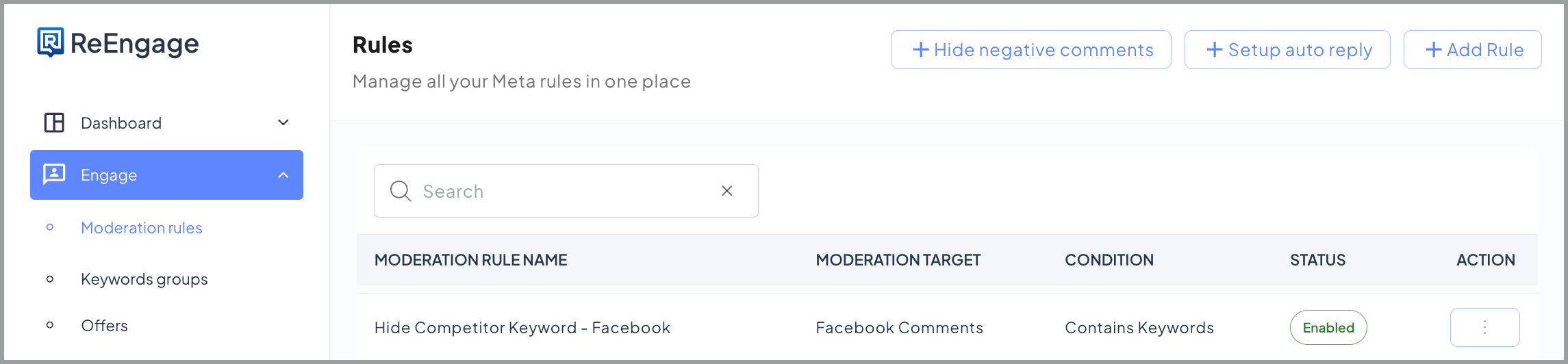
You're done when the rule appears in your rules list and shows as enabled.
***
## 📋 What to include in your keyword list
Common use cases for keyword hiding:
* Competitor names - hide any comment that mentions a competitor
* Spam phrases - repeated phrases used by bots or spammers
* Politically sensitive terms - words you never want associated with your brand
* Specific multi-word phrases - for example, "story worth." A two-word phrase that can't be caught by hiding either word independently
***
## 📋 Platform rules to know
You need a separate keyword hide rule for each platform. The Moderation Target field locks a rule to one platform. A Facebook Comments rule won't catch Instagram comments, and vice versa. Set up duplicate rules if you want keyword hiding on both.
> 📋 Note: The keyword hide rule is a separate rule from your standard "Hide all negative comments" rule. You cannot combine both into one rule. Each must be created independently.
***
## ❓ FAQs
🔍 Q: How do I hide comments containing a competitor's name?
To hide comments containing a competitor's name, add the competitor's name as a keyword in your keyword hide rule.
1. Go to Moderation > Rules and open your keyword hide rule
2. Go to the Conditions section and add a keyword group if you don't have one yet
3. Add each competitor name as a separate keyword entry
4. Save the rule
Any comment containing that word will be hidden automatically. Keywords must be entered one at a time as bulk paste is not supported.
> 📋 Note: If you reach the keyword limit on a group, create a second keyword group.
***
🔍 Q: Why isn't the keyword rule hiding comments containing that word?
If comments containing a keyword aren't being hidden, check these things:
* Wrong platform: Confirm the Moderation Target on your rule matches the platform where the comment appeared. An Instagram rule won't catch Facebook comments.
* Wrong condition: Make sure the condition is set to Contains Keywords, not a combined condition like "Keywords and Sentiment Match"
* Keyword not saved: Confirm the keyword was actually saved in the rule. Keywords must be added one at a time.
***
🔍 Q: What's the difference between keyword hiding and sentiment hiding?
Keyword hiding and sentiment hiding work differently and you need both for full coverage.
* Keyword hiding fires when a comment contains a specific word or phrase you've defined, regardless of the sentiment the AI detects
* Sentiment hiding fires when the AI detects negative sentiment, regardless of whether the comment contains a keyword
A comment can be negative without using any of your keywords, and a comment can contain your keyword without being negative. Two separate rules catch both scenarios.
***
🔍 Q: If I have a DM rule turned on for negative comments, will hiding a comment containing a keyword stop a DM from being sent to that commenter?
Hiding a comment does not stop other rules from firing as long as Processing Mode is set to Advanced. If a DM rule also matches the comment, the commenter will still receive the DM even though their comment is hidden from public view.
***
🔍 Q: How does the keyword hide rule work together with my other rules?
You need a separate keyword hide rule and a separate sentiment hide rule. They cannot be combined into one rule. When Processing Mode is set to Advanced, both rules fire on the same comment, so a comment is caught whether it contains a keyword or is detected as negative by sentiment.
## Related topics
- [Hiding Negative Comments](/moderation/hiding-negative-comments.md)
- [Sending DMs When Someone Comments](/agents/comment-to-dm.md)
- [Auto-replying to Comments](/agents/auto-replies.md)
- [Moderation Rules: Control What Gets Hidden or Flagged](/moderation/rules.md)
- [Understanding Processing Mode](/moderation/processing-modes.md)
2. Give the rule a name (e.g. "Hide Keywords - Facebook")
3. Set Moderation Target to Facebook Comments (or Instagram Comments)
4. Select whether this rule applies to paid engagement, organic engagement, or all
5. Select the pages this rule applies to, or click Add all pages
6. Set Condition to Contains Keywords
7. Add your keywords in the Conditions section
8. Set Action to Hide comment
9. Submit the rule

📋 Known limitation: Keywords must be entered one at a time. Bulk paste is not currently supported. If you reach the keyword limit on a keyword group, create a second group.
You're done when the rule appears in your rules list and shows as enabled.

***
## 📋 What to include in your keyword list
Common use cases for keyword hiding:
* Competitor names - hide any comment that mentions a competitor
* Spam phrases - repeated phrases used by bots or spammers
* Politically sensitive terms - words you never want associated with your brand
* Specific multi-word phrases - for example, "story worth." A two-word phrase that can't be caught by hiding either word independently
***
## 📋 Platform rules to know
You need a separate keyword hide rule for each platform. The Moderation Target field locks a rule to one platform. A Facebook Comments rule won't catch Instagram comments, and vice versa. Set up duplicate rules if you want keyword hiding on both.
> 📋 Note: The keyword hide rule is a separate rule from your standard "Hide all negative comments" rule. You cannot combine both into one rule. Each must be created independently.
***
## ❓ FAQs
🔍 Q: How do I hide comments containing a competitor's name?
To hide comments containing a competitor's name, add the competitor's name as a keyword in your keyword hide rule.
1. Go to Moderation > Rules and open your keyword hide rule
2. Go to the Conditions section and add a keyword group if you don't have one yet
3. Add each competitor name as a separate keyword entry
4. Save the rule
Any comment containing that word will be hidden automatically. Keywords must be entered one at a time as bulk paste is not supported.
> 📋 Note: If you reach the keyword limit on a group, create a second keyword group.
***
🔍 Q: Why isn't the keyword rule hiding comments containing that word?
If comments containing a keyword aren't being hidden, check these things:
* Wrong platform: Confirm the Moderation Target on your rule matches the platform where the comment appeared. An Instagram rule won't catch Facebook comments.
* Wrong condition: Make sure the condition is set to Contains Keywords, not a combined condition like "Keywords and Sentiment Match"
* Keyword not saved: Confirm the keyword was actually saved in the rule. Keywords must be added one at a time.
***
🔍 Q: What's the difference between keyword hiding and sentiment hiding?
Keyword hiding and sentiment hiding work differently and you need both for full coverage.
* Keyword hiding fires when a comment contains a specific word or phrase you've defined, regardless of the sentiment the AI detects
* Sentiment hiding fires when the AI detects negative sentiment, regardless of whether the comment contains a keyword
A comment can be negative without using any of your keywords, and a comment can contain your keyword without being negative. Two separate rules catch both scenarios.
***
🔍 Q: If I have a DM rule turned on for negative comments, will hiding a comment containing a keyword stop a DM from being sent to that commenter?
Hiding a comment does not stop other rules from firing as long as Processing Mode is set to Advanced. If a DM rule also matches the comment, the commenter will still receive the DM even though their comment is hidden from public view.
***
🔍 Q: How does the keyword hide rule work together with my other rules?
You need a separate keyword hide rule and a separate sentiment hide rule. They cannot be combined into one rule. When Processing Mode is set to Advanced, both rules fire on the same comment, so a comment is caught whether it contains a keyword or is detected as negative by sentiment.
## Related topics
- [Hiding Negative Comments](/moderation/hiding-negative-comments.md)
- [Sending DMs When Someone Comments](/agents/comment-to-dm.md)
- [Auto-replying to Comments](/agents/auto-replies.md)
- [Moderation Rules: Control What Gets Hidden or Flagged](/moderation/rules.md)
- [Understanding Processing Mode](/moderation/processing-modes.md)